Introducing Relationship Cadences

Danielle Morrill
Groupthink is a personal CRM that builds itself from your conversations. It sits in on your meetings, reads the notes you forward from other tools, and logs a line the moment you type one, so you remember the people in your life and what matters to them without holding any of it in your head. If this is your first time here, that part already works: your relationships stay current on their own.
Remembering was only ever half of the job. Relationships rarely fade because you forgot who someone was. They fade because six weeks pass, then five months, and by the time the person crosses your mind again the note you would send feels strange to write. Nobody decides to lose touch. It happens in the gap between meaning to reach out and getting to it.
That gap is what relationship cadences are for. Say how often you want to keep up with a person, and Groupthink holds you to it. They are on for every account today.
Say how often you want to keep up with someone
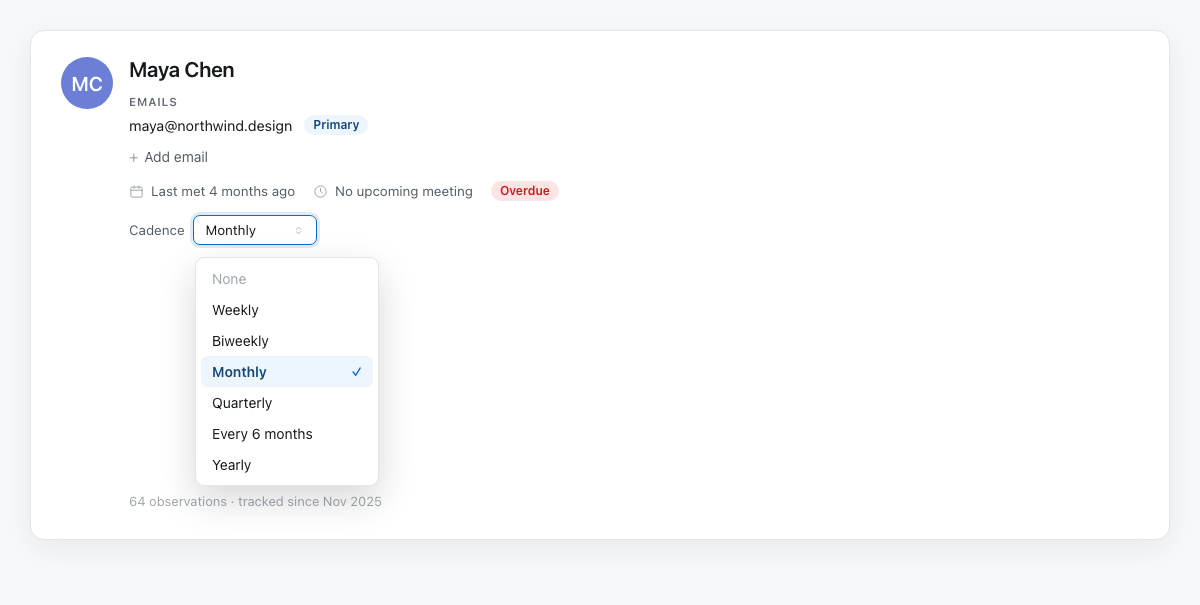
Open a person from Relationships and look under their name for the row labelled Cadence. Pick one: weekly for the collaborator you live in a thread with, quarterly for the client you catch up with a few times a year. It saves the moment you choose. The Relationships list has the same setting in its Frequency column, so a first pass across your whole roster takes minutes instead of an afternoon.
Today shows you who is slipping
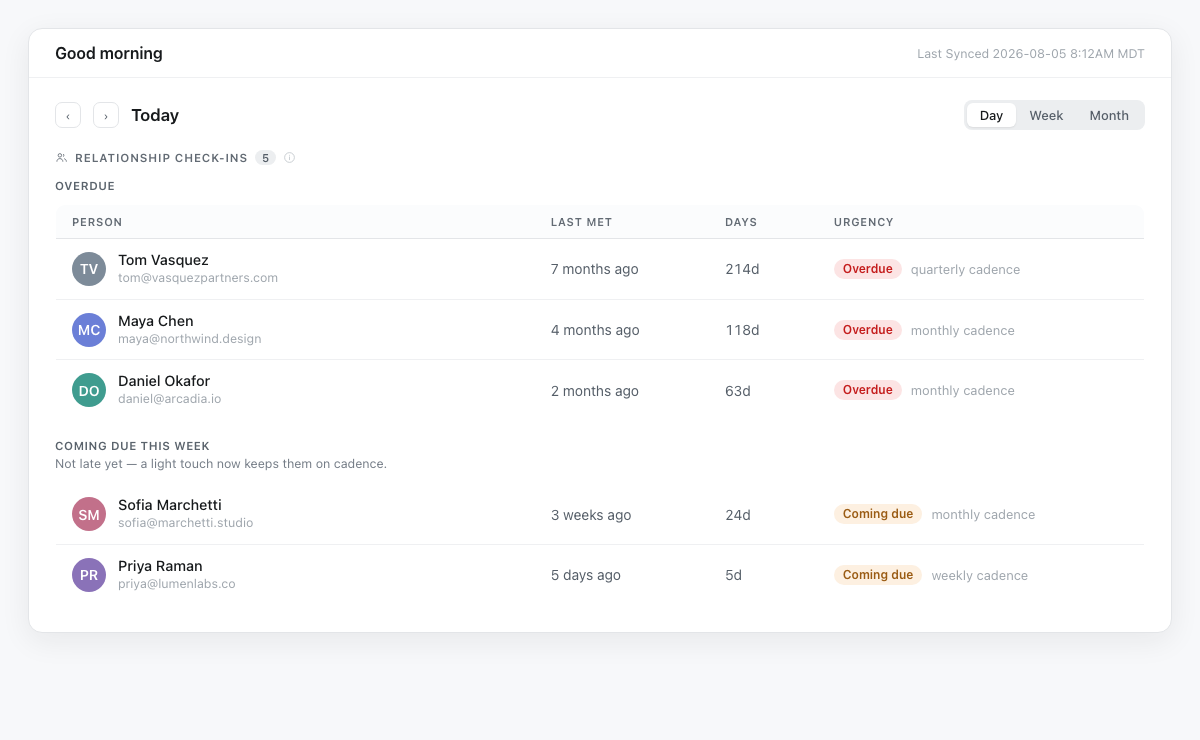
Click Today in the sidebar and scroll to Relationship check-ins. The people you are already past due with come first, under Overdue. Below them, anyone you are about to fall behind with sits in Coming due this week, with a gentler note: not late yet, a light touch now keeps them on cadence.
That split is the part I use most. Coming due is a nudge you can take or leave. Overdue is the person you meant to call in March, surfaced while it is still an easy note to send rather than an apology.
Ask the record what you are forgetting
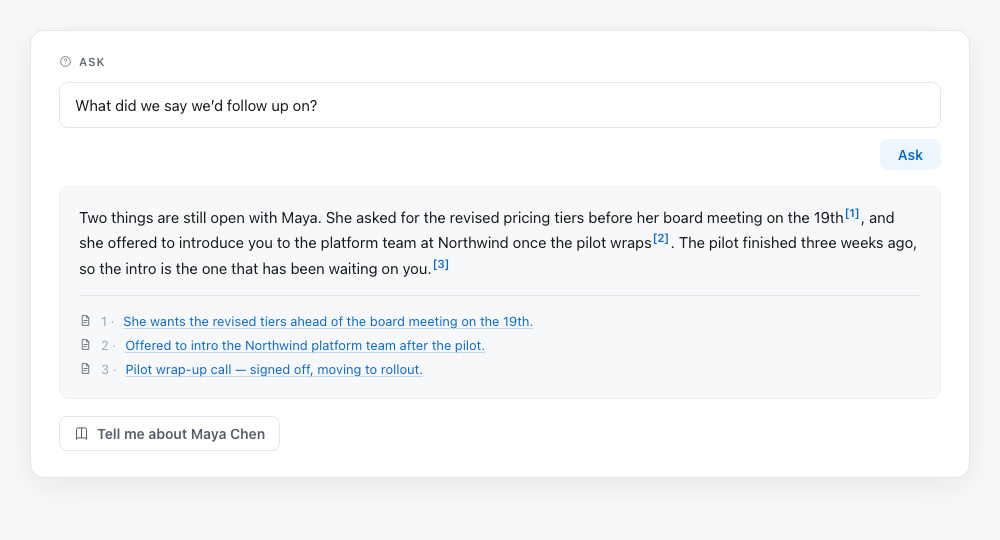
Open a person and there is an “Ask about [Name]” box below their summary. Type the question you would ask a colleague who knows them well. What did we say we would do about the pricing question. How does she like to be approached. What has changed since the spring.
The answer comes back from your own history with that person, with numbered sources under it that point at the interactions each claim came from. No guessing at where a fact came from, and no scrolling six months of timeline to find the one line you half remember.
The draft starts from what you already know
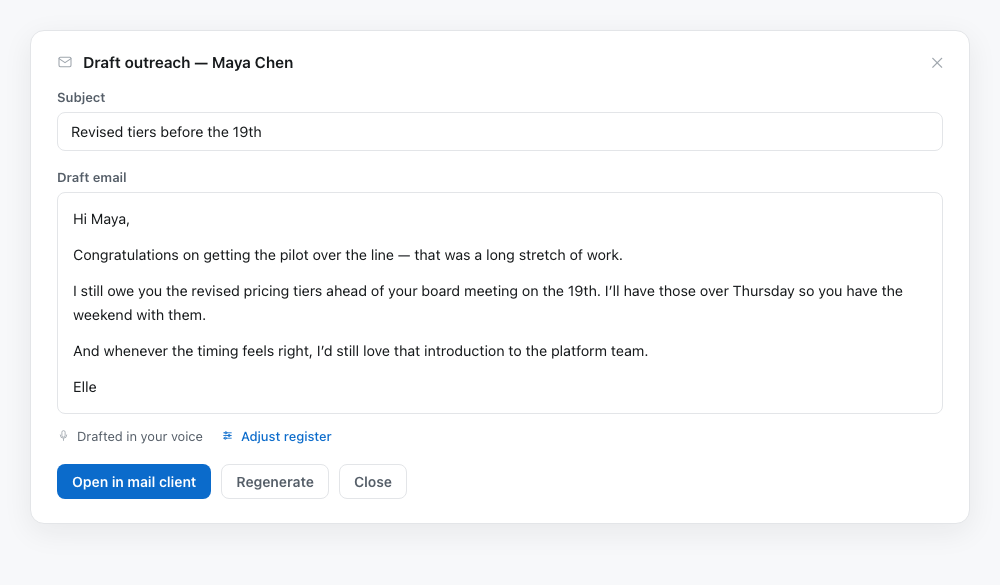
Hit Draft outreach on the same person, add a tone hint if you want one, and the note comes back carrying the context you just read. What you last talked about, what is still open between you, how they like to be approached. The blank page is the reason a note waits three weeks, and this is the part that removes it.
Read it, change what you want, and open it in your own mail client to send. Nothing goes out on its own.
Setting a cadence is the only thing you have to do, and it is one dropdown. If you are new to Groupthink, start free and connect a calendar, and your relationships stay current from your next meeting. If you already have an account, cadences are waiting on the people you have.
Try it on one person
You do not have to do your whole list to get value from it. Pick one person you have been meaning to get back to. Set a cadence for them, ask what you are forgetting, and send the note. Then let Today carry it from there.
The full walkthrough is in the Staying in Touch help doc.
Open Groupthink and start with one person. Remember what matters to make every moment count.