How to Add Groupthink to an Ongoing Meeting

Ali Tyler
Screenshots show Groupthink as of October 2024.
These steps no longer match the app. To send the notetaker to a call today, use + New, then Join by link. Current guides.
Already in a meeting and need Groupthink’s smart tools to keep things on track? No problem! Adding Groupthink mid-meeting is quick and seamless. Here’s how you can easily integrate it into your current call on Zoom, Google Meet, or any other platform.
Step-by-Step Guide
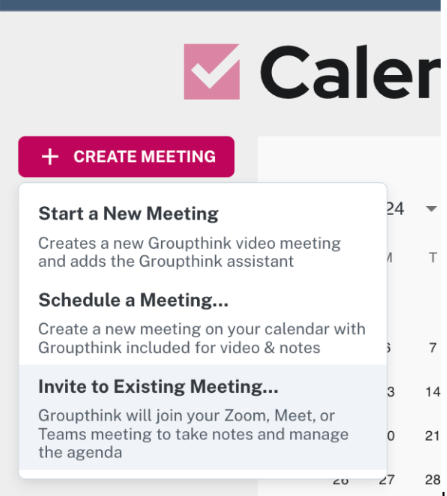
- Find the “Create Meeting” Button In the Groupthink panel, click “Create Meeting” to start the process.
- Select “Invite to Existing Meeting” From the three options, choose the third: “Invite to Existing Meeting.” This lets you add Groupthink to your ongoing call without any interruptions.
- Enter the Meeting URL Groupthink will prompt you to paste the URL of your current meeting—whether it’s on Zoom, Google Meet, or another platform. Once you do, Groupthink will join your call in seconds.
Why Add Groupthink Mid-Meeting?
Even if things are running smoothly, Groupthink adds structure and efficiency. Here’s why it’s worth bringing in:
- Automatic Agendas: Get organized instantly. Groupthink creates agendas so nothing slips through the cracks.
- Real-Time Updates: Groupthink tracks live changes, keeping everyone on the same page.
- No Disruption: Groupthink integrates in real-time, allowing you to stay focused while it handles logistics.
Take Control of Your Meetings
Adding Groupthink to an ongoing meeting unlocks AI-driven features that streamline collaboration. Imagine having a tool that ensures every conversation stays focused and productive, even mid-meeting. Whether you’re deep in a project review or brainstorming, Groupthink has you covered.
Ready to take your meetings to the next level? Sign up for Groupthink today and experience the difference!
Have questions or feedback? Reach out to support@groupthink.com, and we’ll be happy to help!